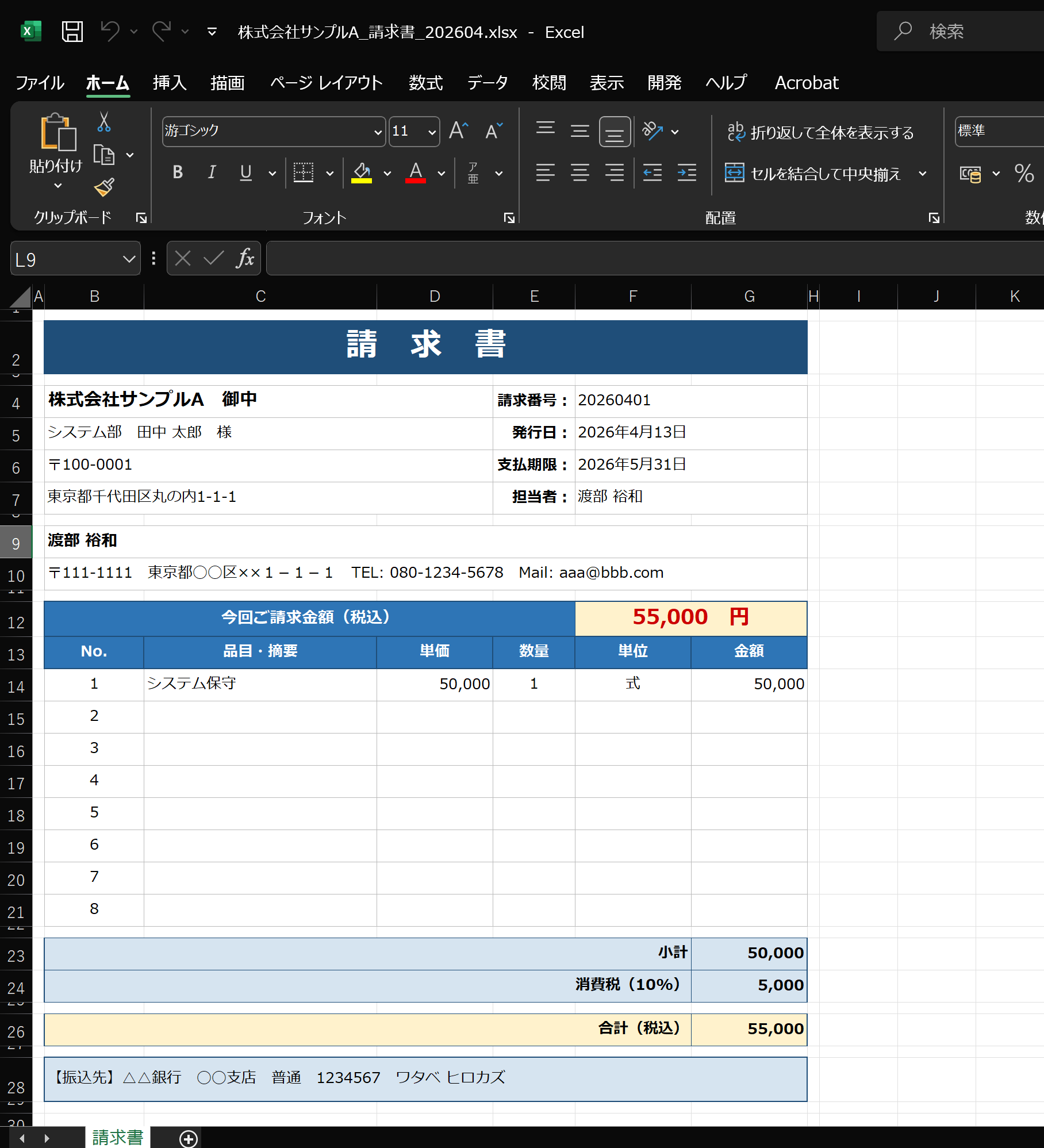
【概要】
Excelに請求データを入力するだけで、請求先ごとの請求書ファイル(.xlsx)を一括で自動生成するツールです。
【デモ動画】
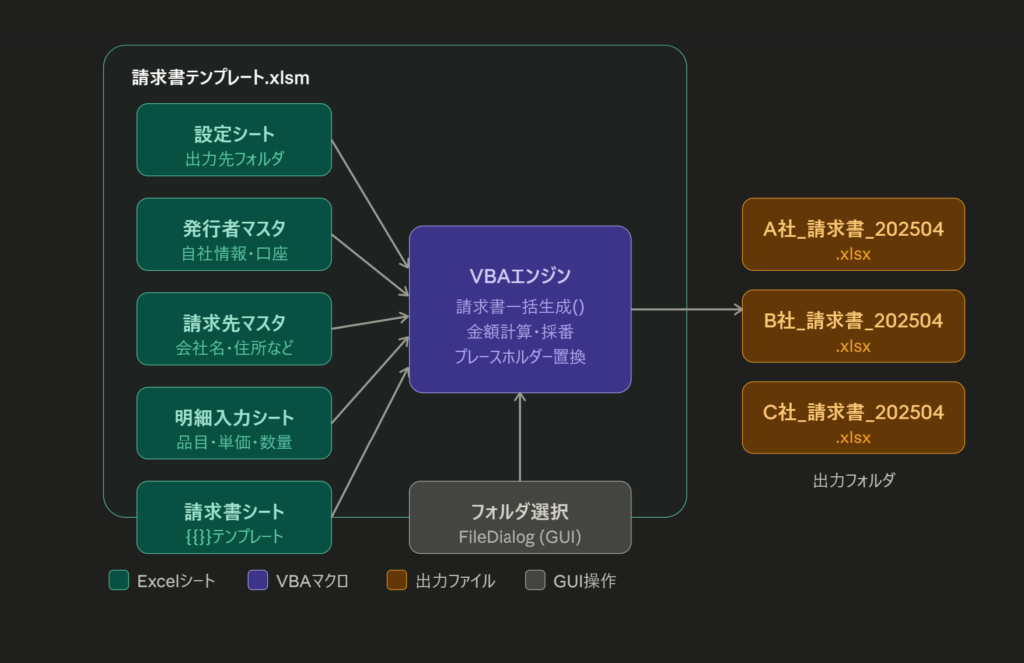
Option Explicit

'==========================================================
' メイン:請求書一括生成
'==========================================================
Public Sub 請求書一括生成()

    '------------------------------------------------------
    ' 0. 変数宣言
    '------------------------------------------------------
    Dim wsSettings  As Worksheet  ' 設定シート
    Dim wsIssuer    As Worksheet  ' 発行者マスタシート
    Dim wsMaster    As Worksheet  ' 請求先マスタシート
    Dim wsDetail    As Worksheet  ' 明細入力シート
    Dim wsTemplate  As Worksheet  ' 請求書テンプレートシート

    Dim outputFolder    As String
    Dim clientID        As String
    Dim prevClientID    As String
    Dim detailLastRow   As Long
    Dim i               As Long
    Dim generatedCount  As Long

    ' 明細バッファ(最大8明細まで)
    Dim itemNames(1 To 8)  As String
    Dim unitPrices(1 To 8) As Long
    Dim qtys(1 To 8)       As Long
    Dim units(1 To 8)      As String
    Dim amounts(1 To 8)    As Long
    Dim itemCount          As Integer
    Dim subtotal           As Long

    '------------------------------------------------------
    ' 1. シート参照セット
    '------------------------------------------------------
    On Error GoTo ErrHandler

    Set wsSettings = ThisWorkbook.Sheets("設定")
    Set wsIssuer = ThisWorkbook.Sheets("発行者マスタ")
    Set wsMaster = ThisWorkbook.Sheets("請求先マスタ")
    Set wsDetail = ThisWorkbook.Sheets("明細入力")
    Set wsTemplate = ThisWorkbook.Sheets("請求書")

    '------------------------------------------------------
    ' 2. 設定シートから出力フォルダを取得
    '------------------------------------------------------
    outputFolder = wsSettings.Range("B2").Value

    If outputFolder = "" Then
        MsgBox "設定シートの「出力先フォルダのフルパス」が空です。", vbCritical
        Exit Sub
    End If

    If Right(outputFolder, 1) <> "\" Then
        outputFolder = outputFolder & "\"
    End If

    If Dir(outputFolder, vbDirectory) = "" Then
        MsgBox "出力フォルダが見つかりません。" & vbCrLf & outputFolder, vbCritical
        Exit Sub
    End If

    '------------------------------------------------------
    ' 3. 発行者情報を取得(発行者マスタシート B列)
    '------------------------------------------------------
    Dim issuerName    As String
    Dim issuerZip     As String
    Dim issuerAddress As String
    Dim issuerTel     As String
    Dim issuerMail    As String
    Dim issuerPerson  As String
    Dim bankName      As String
    Dim bankBranch    As String
    Dim bankType      As String
    Dim bankNo        As String
    Dim bankHolder    As String

    issuerName = wsIssuer.Range("B2").Value      ' 会社名/屋号
    issuerZip = wsIssuer.Range("B3").Value       ' 郵便番号
    issuerAddress = wsIssuer.Range("B4").Value   ' 住所
    issuerTel = wsIssuer.Range("B5").Value       ' 電話番号
    issuerMail = wsIssuer.Range("B6").Value      ' メールアドレス
    issuerPerson = wsIssuer.Range("B7").Value    ' 担当者名
    bankName = wsIssuer.Range("B8").Value        ' 振込銀行名
    bankBranch = wsIssuer.Range("B9").Value      ' 振込支店名
    bankType = wsIssuer.Range("B10").Value       ' 口座種別
    bankNo = wsIssuer.Range("B11").Value         ' 口座番号
    bankHolder = wsIssuer.Range("B12").Value     ' 口座名義(カナ)

    '------------------------------------------------------
    ' 4. 明細入力シートから請求先IDを収集
    '------------------------------------------------------
    detailLastRow = wsDetail.Cells(Rows.Count, 1).End(xlUp).Row

    If detailLastRow < 3 Then
        MsgBox "明細入力シートにデータがありません。", vbExclamation
        Exit Sub
    End If

    ' 明細に存在する請求先IDを順番通りに収集(重複除去)
    Dim allIDs()  As String
    Dim idCount   As Long
    Dim alreadyIn As Boolean
    idCount = 0
    ReDim allIDs(1 To detailLastRow)

    For i = 3 To detailLastRow
        clientID = Trim(CStr(wsDetail.Cells(i, 1).Value))
        If clientID = "" Then GoTo CollectNext
        alreadyIn = False
        Dim chk As Long
        For chk = 1 To idCount
            If allIDs(chk) = clientID Then alreadyIn = True: Exit For
        Next chk
        If Not alreadyIn Then
            idCount = idCount + 1
            allIDs(idCount) = clientID
        End If

CollectNext:
    Next i

    If idCount = 0 Then
        MsgBox "明細入力シートにデータがありません。", vbExclamation
        Exit Sub
    End If

    '------------------------------------------------------
    ' 5. 請求先IDごとに請求書を生成
    '------------------------------------------------------
    generatedCount = 0

    Dim idIdx As Long
    For idIdx = 1 To idCount

        clientID = allIDs(idIdx)
        itemCount = 0
        subtotal = 0
        Dim k As Integer
        For k = 1 To 8
            itemNames(k) = ""
            unitPrices(k) = 0
            qtys(k) = 0
            units(k) = ""
            amounts(k) = 0
        Next k

        ' 明細シートをスキャンして該当IDの行だけ拾う
        For i = 3 To detailLastRow
            If Trim(CStr(wsDetail.Cells(i, 1).Value)) = clientID Then
                If itemCount < 8 Then
                    itemCount = itemCount + 1
                    itemNames(itemCount) = wsDetail.Cells(i, 4).Value
                    unitPrices(itemCount) = CLng(wsDetail.Cells(i, 5).Value)
                    qtys(itemCount) = CLng(wsDetail.Cells(i, 6).Value)
                    units(itemCount) = wsDetail.Cells(i, 7).Value
                    amounts(itemCount) = unitPrices(itemCount) * qtys(itemCount)
                    subtotal = subtotal + amounts(itemCount)
                Else
                    MsgBox "請求先ID「" & clientID & "」の明細が8行を超えています。" & vbCrLf & _
                           "9行目以降はスキップされました。", vbExclamation
                End If
            End If
        Next i

        ' 請求書を出力
        Call 請求書出力(wsTemplate, wsMaster, wsIssuer, _
            clientID, issuerName, issuerZip, issuerAddress, _
            issuerTel, issuerMail, issuerPerson, _
            bankName, bankBranch, bankType, bankNo, bankHolder, _
            itemNames, unitPrices, qtys, units, amounts, itemCount, _
            subtotal, outputFolder)
        generatedCount = generatedCount + 1

    Next idIdx

    MsgBox generatedCount & " 件の請求書を生成しました!" & vbCrLf & outputFolder, vbInformation
    Exit Sub

ErrHandler:
    MsgBox "エラーが発生しました。" & vbCrLf & _
           "エラー番号:" & Err.Number & vbCrLf & _
           "内容:" & Err.Description, vbCritical

End Sub


'==========================================================
' サブ:1請求先分の請求書をテンプレートから生成して保存
'==========================================================
Private Sub 請求書出力( _
    wsTemplate As Worksheet, wsMaster As Worksheet, wsIssuer As Worksheet, _
    clientID As String, _
    issuerName As String, issuerZip As String, issuerAddress As String, _
    issuerTel As String, issuerMail As String, issuerPerson As String, _
    bankName As String, bankBranch As String, bankType As String, _
    bankNo As String, bankHolder As String, _
    itemNames() As String, unitPrices() As Long, qtys() As Long, _
    units() As String, amounts() As Long, itemCount As Integer, _
    subtotal As Long, outputFolder As String)

    '------------------------------------------------------
    ' 請求先マスタから情報取得
    '------------------------------------------------------
    Dim masterRow   As Long
    masterRow = マスタ行取得(wsMaster, clientID)

    If masterRow = 0 Then
        MsgBox "請求先マスタにID「" & clientID & "」が見つかりません。スキップします。", vbExclamation
        Exit Sub
    End If

    Dim clientName    As String
    Dim clientDept    As String
    Dim clientPerson  As String
    Dim clientZip     As String
    Dim clientAddress As String

    clientName = wsMaster.Cells(masterRow, 2).Value     ' 会社名
    clientDept = wsMaster.Cells(masterRow, 3).Value     ' 部署名
    clientPerson = wsMaster.Cells(masterRow, 4).Value   ' 担当者名
    clientZip = wsMaster.Cells(masterRow, 5).Value      ' 郵便番号
    clientAddress = wsMaster.Cells(masterRow, 6).Value  ' 住所

    '------------------------------------------------------
    ' 発行日を今日の日付から生成
    '------------------------------------------------------
    Dim today       As Date
    Dim issueYear   As String
    Dim issueMonth  As String
    Dim issueDay    As String

    today = Date
    issueYear = Year(today)
    issueMonth = Month(today)
    issueDay = Day(today)

    ' 支払期限:翌月末日
    Dim nextMonth   As Date
    Dim deadlineStr As String
    nextMonth = DateSerial(Year(today), Month(today) + 2, 0)    ' 翌月末日
    deadlineStr = Year(nextMonth) & "年" & Month(nextMonth) & "月" & Day(nextMonth) & "日"

    '------------------------------------------------------
    ' 請求番号:YYYYMMxx 形式(簡易)
    '------------------------------------------------------
    Dim invoiceNo As String
    invoiceNo = Format(today, "YYYYMM") & Format(マスタ行取得(wsMaster, clientID) - 2, "00")

    '------------------------------------------------------
    ' 金額計算
    '------------------------------------------------------
    Dim tax   As Long
    Dim total As Long
    tax = CLng(subtotal * 0.1)
    total = subtotal + tax

    '------------------------------------------------------
    ' テンプレートシートをコピーして新規ブック作成
    '------------------------------------------------------
    wsTemplate.Copy
    Dim newWb As Workbook
    Dim newWs As Worksheet
    Set newWb = ActiveWorkbook
    Set newWs = newWb.Sheets(1)

    '------------------------------------------------------
    ' プレースホルダーを一括置換
    '------------------------------------------------------
    Dim repTable(1 To 70, 1 To 2) As String
    Dim r As Integer
    r = 0

    ' 請求先情報
    r = r + 1: repTable(r, 1) = "{{請求先会社名}}":    repTable(r, 2) = clientName
    r = r + 1: repTable(r, 1) = "{{請求先部署名}}":    repTable(r, 2) = clientDept
    r = r + 1: repTable(r, 1) = "{{請求先担当者名}}":  repTable(r, 2) = clientPerson
    r = r + 1: repTable(r, 1) = "{{請求先郵便番号}}":  repTable(r, 2) = clientZip
    r = r + 1: repTable(r, 1) = "{{請求先住所}}":      repTable(r, 2) = clientAddress

    ' 発行者情報
    r = r + 1: repTable(r, 1) = "{{発行者会社名}}":    repTable(r, 2) = issuerName
    r = r + 1: repTable(r, 1) = "{{発行者郵便番号}}":  repTable(r, 2) = issuerZip
    r = r + 1: repTable(r, 1) = "{{発行者住所}}":      repTable(r, 2) = issuerAddress
    r = r + 1: repTable(r, 1) = "{{発行者電話}}":      repTable(r, 2) = issuerTel
    r = r + 1: repTable(r, 1) = "{{発行者メール}}":    repTable(r, 2) = issuerMail
    r = r + 1: repTable(r, 1) = "{{発行者担当者名}}":  repTable(r, 2) = issuerPerson

    ' 日付・番号
    r = r + 1: repTable(r, 1) = "{{請求番号}}":   repTable(r, 2) = invoiceNo
    r = r + 1: repTable(r, 1) = "{{発行年}}":     repTable(r, 2) = issueYear
    r = r + 1: repTable(r, 1) = "{{発行月}}":     repTable(r, 2) = issueMonth
    r = r + 1: repTable(r, 1) = "{{発行日}}":     repTable(r, 2) = issueDay
    r = r + 1: repTable(r, 1) = "{{支払期限}}":   repTable(r, 2) = deadlineStr

    ' 金額
    r = r + 1: repTable(r, 1) = "{{小計}}":      repTable(r, 2) = Format(subtotal, "#,##0")
    r = r + 1: repTable(r, 1) = "{{消費税}}":    repTable(r, 2) = Format(tax, "#,##0")
    r = r + 1: repTable(r, 1) = "{{合計金額}}":  repTable(r, 2) = Format(total, "#,##0")

    ' 振込先
    r = r + 1: repTable(r, 1) = "{{振込銀行名}}": repTable(r, 2) = bankName
    r = r + 1: repTable(r, 1) = "{{振込支店名}}": repTable(r, 2) = bankBranch
    r = r + 1: repTable(r, 1) = "{{口座種別}}":   repTable(r, 2) = bankType
    r = r + 1: repTable(r, 1) = "{{口座番号}}":   repTable(r, 2) = bankNo
    r = r + 1: repTable(r, 1) = "{{口座名義}}":   repTable(r, 2) = bankHolder

    ' 明細(最大8行)
    Dim j As Integer
    For j = 1 To 8
        If j <= itemCount Then
            r = r + 1: repTable(r, 1) = "{{品目" & j & "}}":  repTable(r, 2) = itemNames(j)
            r = r + 1: repTable(r, 1) = "{{単価" & j & "}}":  repTable(r, 2) = Format(unitPrices(j), "#,##0")
            r = r + 1: repTable(r, 1) = "{{数量" & j & "}}":  repTable(r, 2) = qtys(j)
            r = r + 1: repTable(r, 1) = "{{単位" & j & "}}":  repTable(r, 2) = units(j)
            r = r + 1: repTable(r, 1) = "{{金額" & j & "}}":  repTable(r, 2) = Format(amounts(j), "#,##0")
        Else
            ' 未使用行は空欄に
            r = r + 1: repTable(r, 1) = "{{品目" & j & "}}":  repTable(r, 2) = ""
            r = r + 1: repTable(r, 1) = "{{単価" & j & "}}":  repTable(r, 2) = ""
            r = r + 1: repTable(r, 1) = "{{数量" & j & "}}":  repTable(r, 2) = ""
            r = r + 1: repTable(r, 1) = "{{単位" & j & "}}":  repTable(r, 2) = ""
            r = r + 1: repTable(r, 1) = "{{金額" & j & "}}":  repTable(r, 2) = ""
        End If
    Next j

    ' シート全体のセルをループして置換
    Dim cell As Range
    Dim n    As Integer
    For Each cell In newWs.UsedRange
        If cell.Value <> "" Then
            For n = 1 To r
                If InStr(cell.Value, repTable(n, 1)) > 0 Then
                    cell.Value = Replace(cell.Value, repTable(n, 1), repTable(n, 2))
                End If
            Next n
        End If
    Next cell

    '------------------------------------------------------
    ' ファイル名:会社名_請求書_YYYYMM.xlsx
    '------------------------------------------------------
    Dim ym       As String
    Dim fileName As String
    ym = Format(today, "YYYYMM")
    fileName = clientName & "_請求書_" & ym & ".xlsx"

    newWb.SaveAs outputFolder & fileName, xlOpenXMLWorkbook
    newWb.Close SaveChanges:=False

End Sub


'==========================================================
' 関数:請求先マスタからIDに対応する行番号を返す
'==========================================================
Private Function マスタ行取得(wsMaster As Worksheet, clientID As String) As Long
    Dim lastRow As Long
    Dim i       As Long
    lastRow = wsMaster.Cells(Rows.Count, 1).End(xlUp).Row

    For i = 3 To lastRow
        If Trim(CStr(wsMaster.Cells(i, 1).Value)) = clientID Then
            マスタ行取得 = i
            Exit Function
        End If
    Next i

    マスタ行取得 = 0
End Function


'==========================================================
' 出力フォルダ選択ダイアログ(設定シートのボタン用)
'==========================================================
Public Sub フォルダ選択()
    Dim fd As FileDialog
    Set fd = Application.FileDialog(msoFileDialogFolderPicker)

    With fd
        .Title = "出力フォルダを選択してください"
        .InitialFileName = ThisWorkbook.path & "\"
        If .Show = -1 Then
            ThisWorkbook.Sheets("設定").Range("B2").Value = .SelectedItems(1)
        End If
    End With
End Sub
コメントを残す